Local data can be useful when you’re planning outreach for your services and want to know more specifics about the gaps, barriers, and strengths of your community. You may also want to use local data when planning a conference workshop or a staff training. Local data can really drive home why an issue matters to your audience and how their work can contribute to making a difference in their communities.
Local data is also important to funders and government officials; they want to know specific information about how your service fulfills a need. They want to be able to measure the impact of their investment or legislation. The use of local data can help you make your case.
The Center for Victim Research (CVR) Library links to many state-level and regional research reports that include data and statistics about victim services and crime victims. These reports are from a variety of local sources, like universities, non-profits or advocacy organizations, victim services agencies or criminal justice agencies, public health or public safety departments, statistical analysis centers, and other state-level government agencies. Sometimes a broader report may include a section or chapter about violence, abuse, or crime, even if the report’s main topic is economics or public health. If newspapers or magazines include original data analysis on victimization, they may be included in the CVR Library too.
This video tutorial demonstrates how to use the CVR Library to find existing local data. Tips are also listed below the video.
Video Tutorial
Tips
Many of the following tips use OR to connect synonyms in a search strategy. For more information about using Boolean operators like OR and creating a search strategy, review the Supercharge Your Search in the CVR Library tutorial.
- Adding United States OR U.S. OR USA OR America to your search terms can help locate nationwide reports that include state-level information.
- Researchers may mention which region or city their study’s participants come from. Add to your search terms the name of the state, city, or region, like Minnesota OR Twin Cities OR Midwestern.
- Include in your search strategy phrases that are related to statistics, like surveys results OR interview results OR data analysis OR trends OR statistics OR percent OR prevalence OR demographics OR snapshot.
- Add words to your search strategy that relate to a specific type of victimization, like gun violence OR shooting OR firearms OR community violence OR homicides.
- When reviewing a report, check the methods section or the appendix to see if the authors included the dataset or statistical tables with their analysis.
- If you are logged in to VictimResearch.org as a VOCA-funded agency user, you can also use the CVR Library’s “search full text” feature to look for mentions of a state-specific survey or dataset.
More Resources
- For an examination of the National Crime Victimization Survey, read the CVR article by Heather Warnken and Janet Lauritsen: “Who Experiences Violent Victimization and Who Accesses Services? Findings from the National Crime Victimization Survey for Expanding Our Reach.”

Do you ever browse the magazine racks in a bookstore? Sometimes we want an idea of the latest news, but aren’t looking for updates on a particular story. We may not even know what would interest us until we see the headline! Like flipping through magazine pages, new content alerts can raise your awareness of research trends and studies about victimization and victim services. New content alerts are useful when you don’t have a specific research question or study in mind, but you want to keep up with new findings in the field.
New content alerts (also called “table of content” alerts) are free services from subscription journals that send you a list of their latest articles and link to the abstracts or summaries. Usually these alerts only go out every three months, so your inbox won’t be flooded.
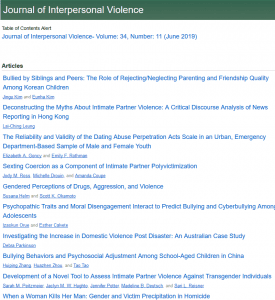
New content alert for the Journal of Interpersonal Violence.
When you start receiving these alerts and reading an article summary, you may want to dive into the full report. There’s no need to pay for full-text articles – the CVR Library already offers you subscription access, at no cost to your program. You can read all the articles you want! To find full-text articles, log into VictimResearch.org and search the article title in the CVR Library searchbox. If the article doesn’t show up in your search, contact the CVR Research Librarian to request the full text.
Follow along with the video below to sign up for new content alerts from SAGE publications, which provides many journals relevant to victim services. Other publishers like Taylor & Francis and Elsevier provide similar free alerts from their journal homepages. Find screenshots and step-by-step instructions for these three publishers below the video. Want more specific alerts? Check out other alert ideas.
You can also do a quick scan of who has published articles on your topic by searching Journals TOC (Table of Contents). The website includes the latest titles from thousands of journals, including some freely available open access journals.
Video instructions
Steps to sign up for SAGE alerts
-
- Visit journals.sagepub.com.
- Search the title of the journal you want alerts from, like Trauma, Violence, and Abuse.

- From the search results page, select the Journals tab and click the title of the journal.
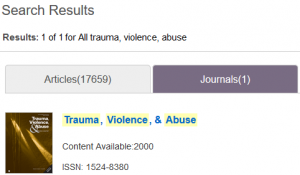
- On the journal publication page, select the About menu and then click Email Alerts.
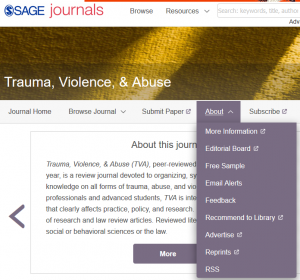
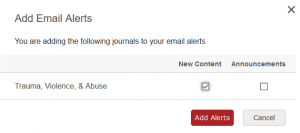
- From the pop up window, select New Content and click Add Alerts.
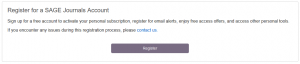
- Register for a free account and start receiving alerts!
The CVR Library subscribes to the following journals on SAGE: Crime and Delinquency, Journal of Interpersonal Violence, Justice Research and Policy, Trauma, Violence, and Abuse, and Violence Against Women. Also, the CVR Research Librarian is able to purchase some articles from SAGE upon request.
Steps to sign up for Taylor & Francis alerts
- Visit www.tandfonline.com.
- Search the title of the journal you want alerts about, like Journal of Human Trafficking.
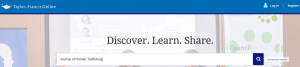
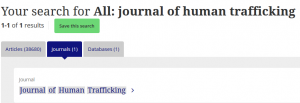
- From the search results page, select the Journals tab and click the title of the journal.
- On the journal publication page, select the New content alerts button.
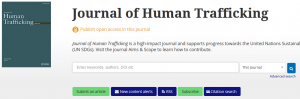
- Register for a free Taylor & Francis account.
- Once you’re logged in, you can add more new content alerts and change how frequently you receive email updates.
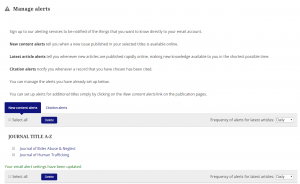
The CVR Library subscribes to the following journals on Taylor & Francis: Journal of Elder Abuse and Neglect, Journal of Human Trafficking, and Journal of School Violence.
Steps to sign up for ScienceDirect (Elsevier) alerts
- Visit www.sciencedirect.com.
- Search the title of the journal you want alerts about, like Child Abuse & Neglect, in the Journal/book title search box.

- From the search results, select the journal by its cover page.
- On the journal publication page, select the Sign in to set up alerts option.
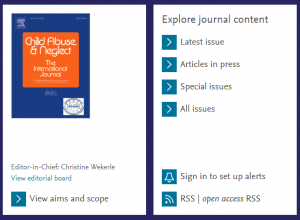
- Register for a free ScienceDirect account.
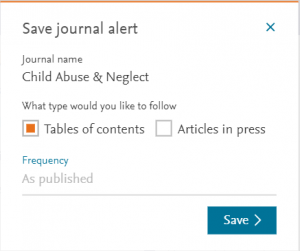
- Once you register, a pop up window offers Save journal alert options. Select Tables of contents type and click Save to start receiving alerts in your email inbox.
The CVR Library does not subscribe to journals on Elsevier, but the CVR Research Librarian is able to purchase some articles upon request. Suggested journals on Elsevier that may be useful for new content alerts include (but are not limited to!): Aggression and Violent Behavior, Child Abuse and Neglect, Children and Youth Services Review, Evaluation and Program Planning, Forensic Science International, Journal of Affective Disorders, Journal of Aging Studies, Journal of Criminal Justice, or The Lancet.
Other alert ideas
- To keep up with articles on specific topics or by specific authors, you may want to set up search alerts.

If you’re interested in a topic, you want regular updates without actively searching for new articles every day. Search alerts are one easy way to keep up with new research about crime victims and victim services. With search alerts, you don’t have to retype your search to discover new studies since the last time you looked. Links to relevant articles automatically arrive in your inbox! Think of search alerts like a colleague forwarding links to new articles or tagging you in a social media post related to your interests.
Follow along with the video and step-by-step instructions below to set up search alerts. Looking for more general updates about new studies in victim services? Check out other ideas for keeping up with research.
Video instructions
Steps to set up a search alert
- Login to VictimResearch.org.
- Create a search in VictimResearch.org/library.
- Confirm that your results are relevant and focused, so your search alert won’t overload you with too many articles. Check out the CVR Library search tips to make sure you’re finding all the relevant articles!
- Open your Search History (a link under the search box) and select the search you want to save. If you do not see a search history listed, click the Search button, and you should see your search appear. Once your search appears in the search history, select the search you want and click the Save Searches/Alerts link.
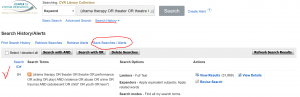
- The first time you save a search alert, you will need to create an account on EBSCOhost. The search alert function (My CVR Library) is hosted by EBSCOhost, so this feature does not know your VictimResearch.org credentials. You can create an account using the same credentials, or completely different credentials.

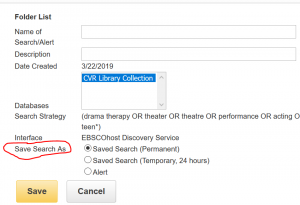
- Next, you will be prompted to name your search and add a description that will help you remember what project this search is for, why you saved it, or what you found. For the Save Search As option, chose the button next to Alert (the final option in the list).
- After you select Alert, you can choose how frequently you want results (weekly or once a month is usually plenty), how long you want the alert to run, and which email inbox you want to receive results.
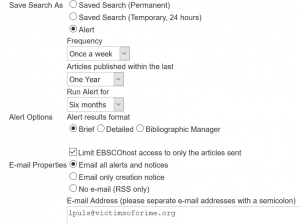
- Click the yellow Save button at the end of the options. Congratulations, you’ve created a search alert!
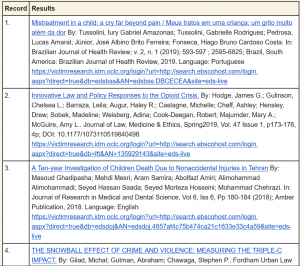
Here’s how the alert article list should look when it arrives in your email inbox:
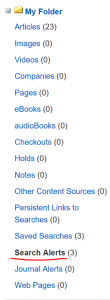
You can edit this alert at any time by logging into My CVR Library, clicking on the folder in the top right, and clicking on Search Alerts in the left hand column.
Other ideas for keeping up with research
- Not sure what topics you want to follow? Getting too many results for your keywords? You may want to try signing up for journal new content alerts. These alerts allow you to receive a list of new articles published in a journal that regularly publishes on topics that interest you.
How To: Save Articles for Later

Sifting through search results to find just the right research article takes time and attention. To keep track of the good articles you find, use “My CVR Library.” With “My CVR Library,” you can save relevant articles and find them quickly when you have time to read them. “My CVR Library” also allows you to organize articles by project or topic.
Follow the video and steps below to create a “My CVR Library” folder and start saving your own collection of relevant articles.
Video instructions
Steps for saving articles in CVR Library
- Login to VictimResearch.org.
- Create a search in VictimResearch.org/library. (Check out the CVR Library search tips to make sure you’re finding all the relevant articles on your topic!)
- To save articles in your results, click the “My CVR Library” link in the teal banner menu, which you can find at the top of the page on the right-hand side. If you don’t see the “My CVR Library” link, go back to VictimResearch.org/login to confirm you are logged in and can access custom CVR Library features.
- The first time you click “My CVR Library,” you will need to create an account on EBSCOhost. “My CVR Library” is part of EBSCOhost, so this feature does not know your VictimResearch.org login information. You can create an account using the same login information, or completely different login information.
- Once you create an account and login to “My CVR Library,” you will be redirected to your search results.
- While scrolling through results, click the folder icon next to article titles you want to save.
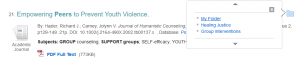
- View your saved articles by scrolling to the top menu and clicking the Folder link. The icon has changed to look it is has papers inside it.

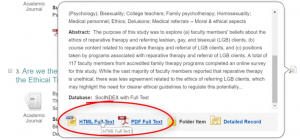
- Read an article description by clicking the magnifying glass next to the article title. Open the full text article by clicking HTML Full Text or PDF Full Text.
- Create custom folders in “My CVR Library” to organize saved articles by topic or project. In the left-hand menu, scroll to My Custom and click New to create a folder.
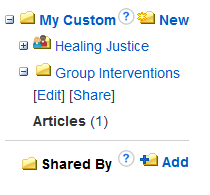
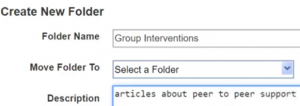
- Chose a distinct name for the folder and add a description so you remember how these articles are related.
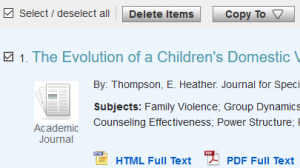
- When articles are no longer relevant, you can remove them from your folder by selecting the checkbox next to article titles and clicking Delete Items. (You can always find the article again by searching the title in CVR Library).
If you have any questions about setting up “My CVR Library,” please email the CVR Research Librarian!
Other ways to save articles
- CVR’s partner library VAWnet allows you to bookmark articles related to gender-based violence, so you can always find your most-used articles. Create a free account and start organizing and sharing your own custom library collection.
- Google Scholar offers a My Library feature for saving relevant articles while searching.

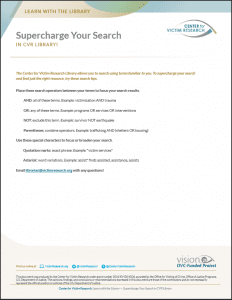
The Center for Victim Research Library allows you to search in your own own words and find relevant research-based materials quickly. Want to find even more? Supercharge your search with these tips:
Place these search operators between your terms to focus your search results.
AND: all of these terms. Example: victimization AND trauma
OR: any of these terms. Example: programs OR services OR interventions
NOT: exclude this term. Example: survivor NOT earthquake
Parentheses: combine operators. Example: trafficking AND (shelters OR housing)
Use these special characters to focus or broaden your search.
Quotation marks: exact phrase. Example: “victim services”
Asterisk: word variations. Example: assist* finds assisted, assistance, assists
Download these tips to keep by your computer, and contact the CVR Research Librarian to work on a search together!
Download PDF
Video Tutorial
Watch this tutorial for a quick tour of the features of the CVR Library:

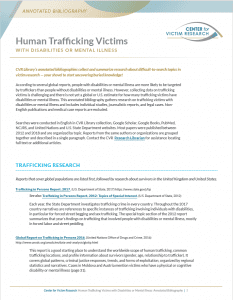
According to several global reports, people with disabilities or mental illness are more likely to be targeted by traffickers than people without disabilities or mental illness. However, collecting data on trafficking victims is challenging and there is not yet a global or U.S. estimate for how many trafficking victims have disabilities or mental illness. This annotated bibliography gathers research on trafficking victims with disabilities or mental illness and includes individual studies, journalistic reports, and legal cases. Non-English publications and medical case reports are excluded.
Methods
Searches were conducted in English in CVR Library collection, Google Scholar, Google Books, PubMed, NCJRS, and United Nations and U.S. State Department websites. Most papers were published between 2012 and 2018 and are organized by topic. Reports from the same authors or organizations are grouped together and described in a single paragraph. Contact the CVR Research Librarian for assistance locating full text or additional articles.
Search Tips
Below are similar or related keywords for:
- Trafficking: exploitation, forced labor, modern slavery, servitude, prostitution
- Disabilities: impaired, disabled
- Mental illness: disorder, depression, anxiety, bipolar, psychotic, schizophrenia
- Prevalence: risk, vulnerability, target, frequency
For the complete report with article links, download the full annotated bibliography:
See more CVR Annotated Bibliographies.
Can I Share Copyrighted Material?
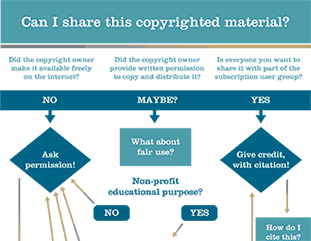
You found a great paper you want to share – use the copyright flowchart before you do!
The CVR Library connects victim services organizations* to specialized subscription journals that focus on victimization research. While searching the collection, you may find a research paper that you know a colleague would find valuable, or that would be a great handout to accompany your presentation. Before you share, check out the copyright flowchart!
The copyright flowchart is a starting point to determine if you can share copyrighted materials under fair use, or if intellectual property rights would prevent sharing. All materials from CVR Library public collection are freely available and can be shared widely.
Example of questions to ask before sharing:
- Who owns this?
- Does the person or group I want to share with also have access to the document?
- What’s my purpose in sharing it?
- How much am I sharing?
An important rule:
Full-text documents from subscription journals should never be uploaded, stored, or copied onto your own website or shared drive. Thank you for respecting CVR Library’s agreement with publishers so we can continue to connect you with quality research.
As always, when in doubt, Ask A Librarian!

*CVR Library’s full collection with subscription journals are available for organizations that receive some Victims of Crime Act funding. Read CVR Library FAQs for more details, or ask the Research Librarian about our subscription terms.
Welcome to CVR Library!

How can CVR Library help me with victim services work?
The Office for Victims of Crime Vision 21 initiative identified the need for an evidence base to support victim services practices. However, linking research to practice presents many challenges. Research is often written for an academic audience and service providers are rarely trained to decode research concepts. Also, buying peer-reviewed articles adds up, and free research reports are scattered across many websites. To address these challenges, Center for Victim Research (CVR) Library offers tools to make research more accessible!
Searchable Collection
CVR Library collection is an easy-to-use search tool for finding research about all types of victimization and victim services. The collection contains both free research-based materials and subscription peer-reviewed articles. CVR Library is regularly updated with materials from CVR Research2Practice network and other authoritative online sources.
Download the Searching CVR Library Collection Features flyer for an overview.
Browse our annotated bibliographies for a selection of articles and reports that include research about human trafficking survivors or culturally relevant programs.
Have a report you’d like to share? Send it to us!
Search Tips
CVR Library blog, Learn with the Library, includes tip sheets with recommended search terms on specific topics, steps to build your online search skills, and questions to ask about a source’s bias and credibility. When you search CVR Library collection, apply these strategies to find more relevant results.
Want tips delivered to your inbox? Sign up for CVR monthly newsletter.
Library Tour Video
Personalized Assistance
In addition to locating research on your own, CVR Library staff can help you craft searches, locate relevant resources, and grow your online search skills. Whether you need statistics to bolster your grant proposal or studies that identify effective practices in your service area, CVR Research Librarian can help you locate existing research.
Have questions about locating research for your program? Ask us!
We look forward to working with you!